HomeBlogCyber Security AwarenessPasswordless Authentication: Common Myths and the Reality
Passwordless Authentication: Common Myths and the Reality

Why Passwordless Authentication Matters
A stolen password can give an attacker a surprisingly simple way into an account. Phishing emails, fake login pages, password reuse and credential stuffing all depend on the same weakness: the attacker gets hold of a credential that the real user can also type.
That is one reason passwordless authentication has gained attention. Instead of asking users to remember another password, it uses an authenticator that is tied to a device, security key or biometric verification. Passkeys are one example. Hardware security keys are another.
The security benefit is particularly important for phishing. A password can be copied from a fake website and used somewhere else. A properly implemented passkey works differently because authentication is tied to the legitimate website or service. There is no password sitting in a browser or inbox for an attacker to collect and reuse.
There are practical benefits as well. Password resets take time, forgotten credentials create support requests, and users often end up managing passwords across several services. Removing that dependency can make sign-in simpler while reducing some of the work involved in password management.
Passwordless authentication still requires careful implementation. Device security, account recovery, identity management and access policies all matter. Removing passwords does not remove every way an account can be compromised.
What Is Passwordless Authentication
Passwordless authentication verifies a user’s identity without asking them to enter a memorised password. The method used for verification depends on the technology and the environment.
A user might unlock a passkey with a device’s PIN or fingerprint, use a physical security key, or authenticate through another trusted device. In these cases, the user proves control of an approved authenticator rather than typing a reusable password.
Passkeys and FIDO2-based authentication use public key cryptography. During registration, a key pair is created. The private key stays protected by the authenticator, while the service keeps the corresponding public key.
When the user signs in later, the service sends an authentication challenge. The authenticator responds using the private key, and the service checks that response against the registered public key. The private key itself is not sent to the service.
That difference is important when considering passwordless security. An attacker who captures information from a fake login page cannot simply take a passkey response and use it as a password somewhere else.
How Passwordless Authentication Works
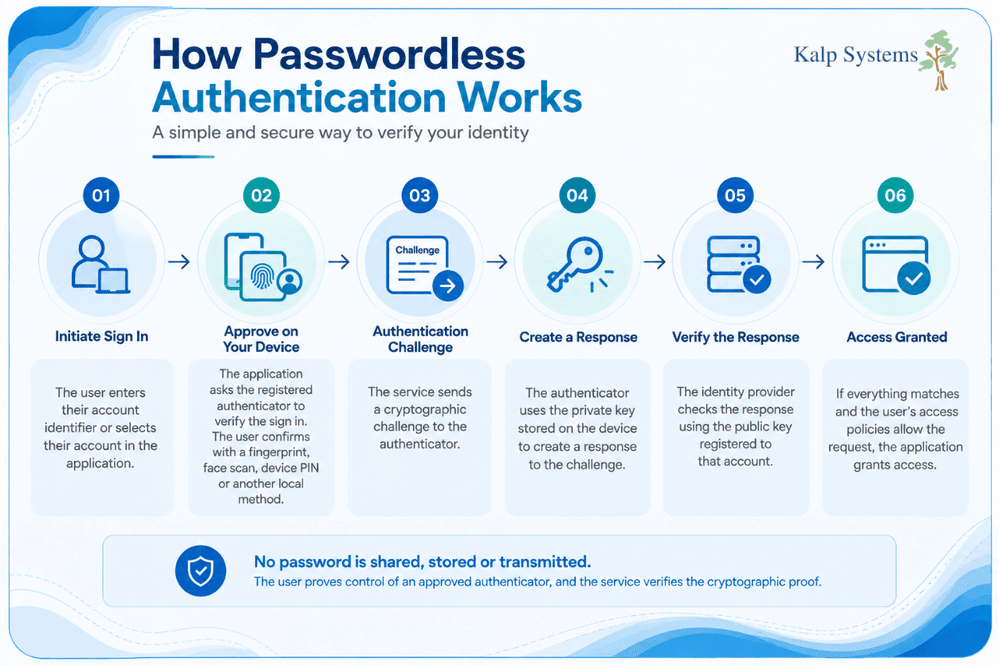
Consider a user signing in to a business application with a passkey.
The user enters their account identifier or selects their account. The application asks the registered authenticator to verify the sign-in. The user may then confirm the request with a fingerprint, face scan, device PIN or another local method, depending on the device and authenticator.
The authenticator creates a response to the service’s challenge. The identity provider checks the response using the public key registered to that account. If everything matches and the user’s access policies allow the request, the application grants access.
The biometric step, when used, is generally a local check that unlocks the authenticator. The application does not need the user’s raw fingerprint or face image to verify the sign-in.
This is the basic idea behind modern passwordless authentication: the user proves possession of an approved authenticator, and the service verifies the cryptographic proof.
Common Passwordless Authentication Methods
Passwordless authentication can be implemented in several ways, and the chosen method often depends on the devices, applications, and identity systems already in use.
Passkeys and FIDO2 use public key cryptography and are designed to provide phishing-resistant authentication. A passkey can be stored on a user’s device or managed through a compatible password manager, allowing the user to sign in after verifying themselves on the device.
Security keys are physical authenticators that users can connect to a device when signing in. They are commonly used for protecting higher-risk accounts or privileged users because the authentication credential is held on a dedicated device.
Biometric authentication uses characteristics such as a fingerprint or face to verify the user locally on a supported device. In many implementations, the biometric check unlocks the credential stored on the device rather than sending the user’s biometric information to the application.
Device-based authentication can also be used when an organisation wants access to depend on a trusted, enrolled device. Device identity can be combined with other controls to determine whether a user should be allowed to access a particular application or resource.
The important point is that these methods do not all provide the same security properties. Security teams should consider phishing resistance, device protection, recovery options and the sensitivity of the applications being protected when selecting an approach.
Is Passwordless Authentication Secure
Passwordless authentication can provide strong protection against several attacks that target traditional passwords, particularly when businesses use phishing-resistant methods such as FIDO2 and passkeys.
The security advantage comes from how authentication credentials are created and used. A password can be copied, disclosed or reused. A cryptographic credential used by a passkey or security key works differently, making it much harder for an attacker to obtain something they can simply type into another login page.
That does not mean every passwordless implementation has the same level of protection. The surrounding controls still matter. Security teams need to secure user devices, manage authenticators throughout their lifecycle and provide a recovery process that does not create an easier route around the primary authentication method.
Phishing Resistance and Credential Protection
Phishing attacks often succeed because users are persuaded to enter their passwords into a fraudulent website. The attacker can then use those credentials against the real service.
FIDO2 and passkeys address this problem through cryptographic authentication that is bound to the legitimate service. The authenticator does not simply hand over a reusable password that an attacker can copy.
This makes phishing considerably harder, particularly for attacks designed to steal credentials through fake login pages. It also reduces the value of password databases because there is no traditional password to retrieve and reuse.
For businesses dealing with privileged accounts, remote access or sensitive applications, this phishing resistance can be an important reason to consider passwordless authentication.
Security Risks That Still Remain
Passwordless authentication reduces certain risks, but other parts of the authentication process still need attention.
A compromised device can create problems if an attacker gains control of the user’s session or device. Poorly designed account recovery can also weaken an otherwise strong authentication system. A business may have strong passkeys in place but still expose accounts through an insecure recovery process.
Identity lifecycle management matters as well. When employees join, change roles or leave the company, their authenticators and access rights need to be updated accordingly.
For this reason, passwordless authentication should be treated as one part of a broader access security strategy. Device protection, identity governance, monitoring and appropriate access policies remain important.
Common Myths About Passwordless Authentication
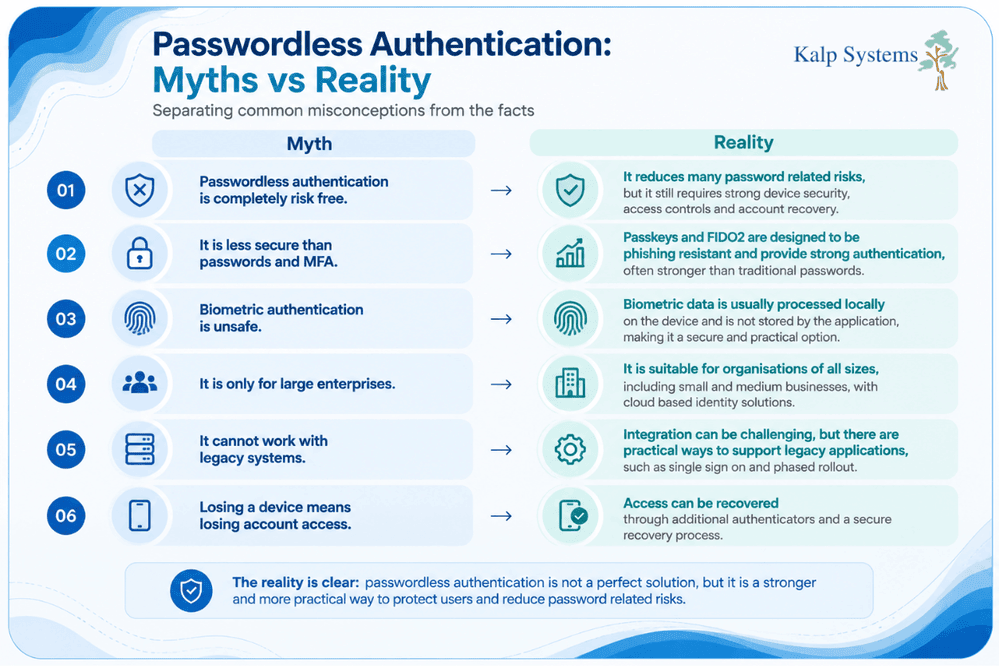
Passwordless authentication is often discussed as though removing passwords automatically solves every problem associated with account security. In practice, the security outcome depends on the authentication method, the devices being used and the controls around identity and access. Some concerns about passwordless authentication are valid, but several common assumptions do not reflect how current technologies such as passkeys and FIDO2 actually work.
Passwordless Authentication is Completely Risk Free
Removing passwords takes several risks linked to password theft, reuse and credential stuffing, but it does not make an account immune to attack. A user can still be affected by a compromised device, malicious software, weak access controls or an improperly protected recovery process.
Passwordless authentication should therefore be supported by controls that protect the device and manage access throughout the user’s lifecycle. Monitoring unusual authentication activities and reviewing permissions are also important, particularly for privileged and high-risk accounts.
The practical benefit is a smaller set of password-related risks, rather than the removal of every identity security risk.
Passwordless Authentication is Less Secure Than Passwords and MFA
This concern often comes from assuming that a password is still needed to make authentication secure. The strength of an authentication setup depends on the factors being used and how resistant they are to attacks such as phishing.
Passkeys and FIDO2-based authentication use cryptographic credentials and are designed to resist phishing. An attacker cannot simply collect a passkey through a fake login page in the same way they can collect a password.
Passwordless authentication can also be combined with controls such as device checks, conditional access and risk-based policies. The choice should depend on the sensitivity of the account and application, rather than on the assumption that keeping a password automatically makes the system safer.
Biometric Authentication is Unsafe
Biometric authentication raises a reasonable question: what happens if biometric information is stolen?
The answer depends on how the biometric system is designed. Many modern devices perform biometric verification locally. The fingerprint or face scan is used to unlock the authenticator on the device, rather than sending raw biometric information to the application each time the user signs in.
This means businesses can avoid relying on a central database of raw biometric data for authentication. Even so, biometric security should be assessed together with device security, authenticator protection and account recovery procedures.
Passwordless Authentication is Only for Large Enterprises
Passwordless authentication is not limited to organisations with large security teams or complex identity infrastructure. Cloud-based identity services have made several passwordless options accessible to smaller businesses as well.
The right approach will depend on the applications, devices and identity systems already in use. A smaller business may begin with administrators or other high-risk accounts and expand the rollout after testing the process.
Starting with a limited group can also reveal practical issues around device management, user onboarding and account recovery before passwordless authentication is introduced more widely.
Passwordless Authentication cannot Work with Legacy Systems
Legacy applications can create integration challenges, especially when they only support traditional username and password authentication. That can make a full transition difficult, but it does not necessarily prevent a company from introducing passwordless authentication elsewhere.
Single sign-on and identity federation can help connect supported applications to a central identity system. Businesses can also maintain existing authentication methods for applications that cannot yet be integrated while moving compatible services to stronger authentication.
A phased rollout is often more practical than trying to change every application at the same time. It allows the security team to prioritise critical systems while developing a longer-term plan for older applications.
Losing a Device Means Losing Account Access
A lost phone or computer can be a problem when it contains an authenticator, but it does not have to result in permanent loss of access. Businesses can plan for device loss by registering additional authenticators where appropriate and establishing a controlled recovery process.
A lost authenticator should be revoked so that it can no longer be used for authentication. The user can then be enrolled with a replacement device or another approved authenticator.
Recovery deserves particular attention because a weak fallback method can undermine the security of the primary passwordless method. The recovery process should be protected with the same level of care as the normal sign-in process.
Benefits and Challenges of Passwordless Authentication
Passwordless authentication can improve both security and the day-to-day login experience, but the benefits depend on how it is deployed. Removing passwords can reduce several common attack paths and password-related support work. At the same time, IT teams need to plan for device management, user onboarding and account recovery before rolling it out.
Reduced Credential-Based Attacks
One of the clearest benefits is the reduction in attacks that depend on stolen or reused passwords. Passwordless methods such as passkeys and security keys do not require users to provide a reusable password during sign-in.
This can reduce exposure to password phishing, credential stuffing and password reuse. An attacker who obtains a password from another breach also has less value to gain when an account no longer depends on that password for authentication.
The benefit is especially relevant for accounts with access to sensitive systems. Protecting administrators, remote users and other high-risk accounts with phishing-resistant authentication can reduce the chance that a stolen credential becomes an entry point.
Improved User Experience and Lower IT Overhead
Password management creates work for both users and IT teams. Forgotten passwords lead to reset requests, while password policies can make authentication frustrating when users have to remember different credentials across multiple systems.
Passwordless sign-in can simplify this experience. Depending on the method, a user may authenticate with a device’s PIN, fingerprint, face verification or a security key rather than typing a password.
There can also be an operational benefit for IT teams. Fewer password reset requests can reduce routine support work and allow teams to spend more time on other identity and security tasks.
Device, Recovery and Implementation Challenges
Passwordless authentication introduces its own practical considerations. If a user’s authenticator is tied to a device, that device needs to be protected and managed appropriately. Lost, stolen or replaced devices also need to be handled without creating gaps in access security.
Account recovery is another important consideration. Users need a reliable way to regain access when an authenticator becomes unavailable, but the recovery process should not become an easier route for an attacker to bypass the primary authentication controls.
There can also be integration challenges when applications use older authentication technologies. IT teams may need to combine passwordless authentication with existing identity systems and introduce it gradually rather than changing every application at once.
Passwordless Authentication and Modern Security
Passwordless authentication fits into a wider identity security strategy. The strongest implementations do not rely on the authentication method alone. They combine secure authenticators with controls that consider the user, device and circumstances of each access request.
Passkeys and FIDO2
Passkeys and FIDO2 are among the most important technologies behind modern passwordless authentication. They use public key cryptography, with the private key protected by the user’s authenticator.
They are also designed to resist phishing because the authentication process is associated with the legitimate website or service. This makes it difficult for an attacker to use a fake login page to obtain something that can be reused against the real service.
For IT teams looking to reduce dependence on passwords, passkeys and FIDO2 provide a practical way to strengthen authentication while keeping the sign-in process relatively simple for users.
Zero-Trust and Conditional Access
Passwordless authentication can support a Zero Trust approach by strengthening how user identity is verified before access is granted. The authentication decision can also take other factors into account, such as the user’s device, location, application and level of risk.
Conditional access policies can be used to respond to those conditions. For example, a request from an unmanaged or potentially compromised device may require additional verification or be blocked altogether.
This combination is useful because strong authentication alone does not tell the security team whether the device being used should be trusted.
Passwordless Authentication and MFA
Passwordless authentication and multi-factor authentication are related, but they are not interchangeable in terms. MFA requires more than one authentication factor, while passwordless describes authentication without a memorised password.
A passwordless method can provide strong authentication on its own, depending on the authenticator and implementation. Additional controls can also be used when security teams need stronger assurance for sensitive applications or higher-risk access.
The important consideration is the strength of the authentication method and the surrounding access controls, rather than simply counting the number of steps in the login process.
Best Practices for Adopting Passwordless Authentication
A successful passwordless rollout needs more planning than simply enabling a new sign-in option. Security and IT teams need to understand which users and applications should move first, how devices will be managed and what happens when someone loses access to an authenticator. A phased approach gives security and IT teams time to address these issues before expanding the rollout.
Assess Identity and Device Risks
Start by reviewing which users, applications and accounts present the greatest risk. Privileged accounts, remote users and access to sensitive systems may be good candidates for an early rollout.
The assessment should also cover the devices used for authentication. IT teams need to know whether those devices are managed, supported and protected before relying on them as part of the authentication process.
Plan a Phased Rollout
Moving every user to passwordless authentication at once can make problems harder to isolate. A smaller initial rollout allows the team to test authentication, onboarding, device management and recovery procedures with a controlled group.
Administrators and other high-risk users can be considered for the first phase. Feedback from that group can then be used to improve the process before extending passwordless authentication to the wider workforce.
Secure Account Recovery
Recovery should be planned before passwordless authentication is introduced. Users will eventually lose a device, replace a phone or lose access to an authenticator.
Recovery procedures should verify the user’s identity and provide a controlled way to register a new authenticator. Weak fallback passwords or easily bypassed verification questions can create an alternative path for attackers, so recovery should receive the same security attention as the normal sign-in process.
Protect Devices and Authenticators
A passwordless credential is only as well protected as the environment in which it is stored and used. Devices should have appropriate security controls, and lost or compromised authenticators should be revoked promptly.
IT teams should also maintain clear processes for enrolling, replacing and removing authenticators. This becomes particularly important when employees change roles or leave the organisation.
Train Users and Monitor Authentication Activity
Users need to understand how the new sign-in process works and what they should do if they receive an unexpected authentication request or lose their device. Short, practical guidance can help users recognise suspicious activity and report problems quickly.
After deployment, authentication activity should also be monitored. Unusual login behaviour, repeated authentication failures or unexpected changes to authenticators can provide useful signals for security teams.
How Kalp Systems Supports Passwordless Security Adoption
Adopting passwordless authentication requires more than selecting an authentication method. Businesses need to consider identity risks, existing applications, device security, user onboarding and the controls needed to manage authentication over time.
Kalp Systems helps businesses assess these requirements and plan passwordless authentication around their existing security environment. The approach can include identity risk assessment, deployment planning, access controls and governance, with the aim of strengthening authentication without creating unnecessary disruption for users and business applications.
Conclusion
Passwordless authentication can remove several weaknesses associated with traditional passwords, particularly password reuse, credential theft and phishing-based attacks. Technologies such as passkeys and FIDO2 provide a stronger way to verify users while reducing reliance on reusable credentials.
Technology still needs to be implemented carefully. Device security, identity lifecycle management, account recovery and access policies all affect the overall security of a passwordless environment. Businesses also need to consider legacy applications and give users enough guidance to adopt new authentication methods confidently.
For businesses reviewing their authentication strategy, passwordless authentication can be a practical way to reduce credential-related risks while improving the sign-in experience. The right approach depends on the company’s users, devices, applications and existing identity controls.
Frequently Asked Questions
Is Passwordless Authentication Really Secure?
Yes. Passwordless authentication can provide strong protection against password theft, phishing and credential stuffing, particularly when phishing resistant methods such as passkeys and FIDO2 are used. Security still depends on device protection, identity controls and a properly secured recovery process.
Can Passwordless Authentication be Hacked?
Passwordless authentication can still be targeted through attacks against devices, accounts, sessions or recovery processes. However, phishing resistant methods make it much harder for attackers to steal a reusable credential through a fake login page. Strong device security, monitoring and access controls remain important.
What Happens if I Lose My Device?
The company should have a recovery process for lost or replaced devices. A lost authenticator can be revoked, and the user can be enrolled with another approved authenticator after their identity has been verified. Additional registered authenticators can also help reduce disruption when a primary device becomes unavailable.
Are Passkeys Safer than Passwords?
Passkeys can provide stronger protection against phishing and credential theft than traditional passwords. They use public key cryptography, and the private key remains protected by the authenticator. This means there is no reusable password for an attacker to capture and use another service.
Does Passwordless Authentication Replace MFA?
Not necessarily. Passwordless authentication means that a memorised password is not required, while MFA refers to using multiple authentication factors. Depending on the authenticator and the business’s security requirements, passwordless authentication can be used with additional controls such as device checks, conditional access and risk-based authentication.