HomeBlogApplication SecurityHealthcare Access Control: Logical vs Physical Access Control
Healthcare Access Control: Logical vs Physical Access Control

What Is Healthcare Access Control?
Healthcare access control covers the people, systems, devices, and areas that need to be protected within a healthcare organisation. A doctor may need access to patient records, while a technician may need to enter a laboratory, or a vendor may only need access to a particular area for a short period.
That sounds manageable until those requirements start changing. Someone moves to another department. A contractor finishes a job. An employee leaves. New responsibilities are added. Access that made sense when it was first given may no longer make sense a few months later.
This is where healthcare access control becomes difficult to manage. It includes both logical access to systems and information and physical access to buildings, rooms, and equipment. Keeping track of both matters because an access gap does not always stay within one area. A physical access issue can expose systems or equipment, while excessive digital access can put sensitive healthcare information at risk.
Understanding Logical Access Control in Healthcare
Logical access control gets complicated quickly in healthcare because there are so many systems involved. An organisation may have electronic health records, billing platforms, diagnostic tools, internal applications, and connected medical devices, all with their own access requirements.
Most organisations use identity-based access, with permissions linked to a person’s role. A doctor may need access to clinical records, for example, while someone working in billing needs access to financial and insurance information. The problem usually starts later, when those roles change, and the old permissions stay in place.
Someone moves to another department. Someone else takes on temporary responsibility. A contractor needs access for a particular job. Access gets added when it is needed, but it is not always removed afterwards. Over time, a person’s permissions can start to look very different from what they actually need.
How Logical Access Control Works
The starting point is the user’s identity and the systems they need to use. From there, access is assigned according to their roles and responsibilities.
Take a hospital doctor as an example. They may need access to patient records and clinical applications as part of their work. That does not mean they need access to billing systems or every application used across the organisation.
The same principle applies when someone’s role changes. Their access needs to change with it. If the old permissions remain, the organisation can end up with accounts that have more access than the user actually needs.
Common Logical Access Controls in Healthcare
There are several controls organisations can use to manage this access. Role-based access control helps link permissions to job responsibilities. Multi factor authentication adds another check when someone signs in. Identity and access management tools can help with creating accounts, changing permissions, and removing access when it is no longer required.
Other controls include single sign-on, privileged access management, password controls, user provisioning and deprovisioning, and audit logs.
MFA is useful, but it only answers one part of the problem. It can help verify the person signing in. It does not tell you whether that person still needs the access they already have.
Examples of Logical Access Control in Healthcare
Consider a nurse who moves from one department to another. Their new role may require access to different systems, but some of their previous permissions may still be active. A regular access review can identify those permissions and remove anything that is no longer needed.
The same issue can occur with temporary access. An IT employee may need elevated permissions while fixing a system, or a vendor may need access to a particular application during a support task. Once the work is finished, those permissions should be removed.
These are the kinds of situations that logical access control systems for healthcare need to handle. The initial assignment of access is only one part of the process. What happens to that access afterwards matters just as much.
Understanding Physical Access Control in Healthcare
Physical access control is about deciding who can enter a particular place, and which areas should be restricted. In healthcare, that can be difficult because hospitals are busy environments. Patients, families, staff, contractors, and vendors may all be moving through the same building.
Some areas need tighter control than others. Pharmacies, operating rooms, laboratories, and data centres are good examples. These areas may contain medicines, sensitive equipment, patient information, or critical systems, so access cannot simply be left open.
The problem also does not end once someone is given access. Staff change roles, contractors finish their work, and employees leave. If their physical access is not updated at the same time, an old access card or biometric permission can continue to work when it should not.
Common Physical Access Controls in Healthcare
Healthcare facilities use different controls depending on the area and the level of access required. Access cards are commonly used to control entry to staff only areas, while biometric systems can provide another way of checking a person’s identity before allowing entry.
Other controls can include locked doors, security personnel, visitor access procedures, cameras, and access logs. The choice depends on the area being protected and who needs to enter it.
The important part is keeping these controls up to date. Giving someone access is only the starting point. Their permissions also need to be changed or removed when their role or responsibilities change.
Examples of Physical Access Control in Healthcare
A hospital pharmacy may restrict entry to authorised staff, while a laboratory may use access cards or biometric checks to limit who can enter. A data centre may have another layer of physical access control because of the systems and equipment inside.
Temporary access is another common example. A vendor may need to enter a restricted area to repair equipment, but that access should not remain active once the work is finished.
The same issue can arise when an employee leaves the organisation. Their system account may be disabled quickly, while their physical access card is overlooked. If the two are managed separately, that gap can leave a former employee with access to areas they no longer need.
Logical vs Physical Access Control in Healthcare
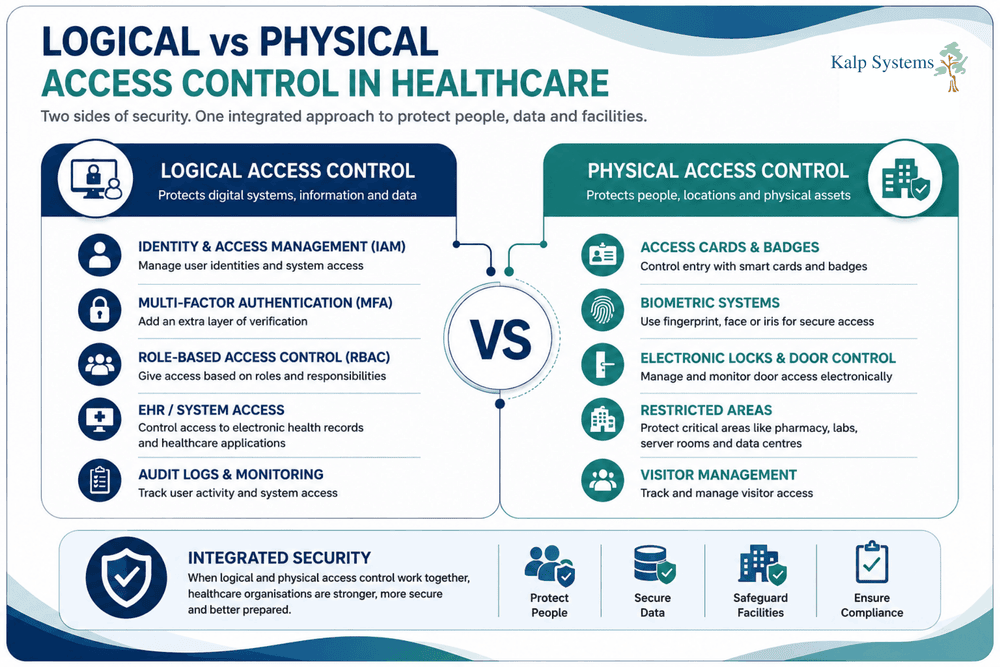
A healthcare organisation needs to control access to both its digital environment and its physical facilities. Logical access control deals with systems, applications, and information, while physical access control deals with the places and equipment people can physically reach.
The two work differently, but the reason for using them is similar. Access should match what a person actually needs for their role, and those permissions should change when their responsibilities change.
Key Differences Between Logical and Physical Access Control
The simplest difference is what each type of control protects. Logical access control protects digital resources such as electronic health records, applications, networks, and databases. Physical access control protects areas such as pharmacies, laboratories, operating rooms, and data centres.
The way access is granted also differs. A user may sign in with a username, password, and multi factor authentication to reach a system, while physical access may involve an access card or biometric check.
Why Healthcare Organisations Need Both
Having strong controls on one side does not solve problems on the other. A healthcare organisation may have good protection around its systems, but someone could still gain access to a restricted room or equipment. The reverse is also possible. Physical security can be well managed while a user continues to have unnecessary access to sensitive systems.
This matters even more in healthcare because systems and physical environments often sit close together. A restricted room may contain devices connected to the organisation’s network, while staff working in that room may also have access to patient information.
Why Integration Matters
The bigger problem often appears when the two types of access are managed separately. An employee leaves the organisation and their system account is disabled, for example, but their physical access card may still work.
The same issue can affect contractors and vendors. Their access may be intended for a particular task or period, but one side may be updated while the other is overlooked.
Bringing physical and logical access information together gives security teams a better view of what is happening. It can also make investigations easier. A system log can show when an account was used, while a physical access record can show whether that person entered the relevant area at the same time.
Healthcare Access Control Systems and Solutions
Healthcare organisations use different systems to control access to their buildings, applications, devices, and information. The systems may be managed separately, but they all serve the same basic purpose, controlling who can access something and when.
The challenge comes when access changes. A person may need access to one system but not another or may need to enter a restricted area for only a short period. Keeping those permissions up to date becomes harder as the number of users, systems, and locations grows.
Logical Access Control Systems
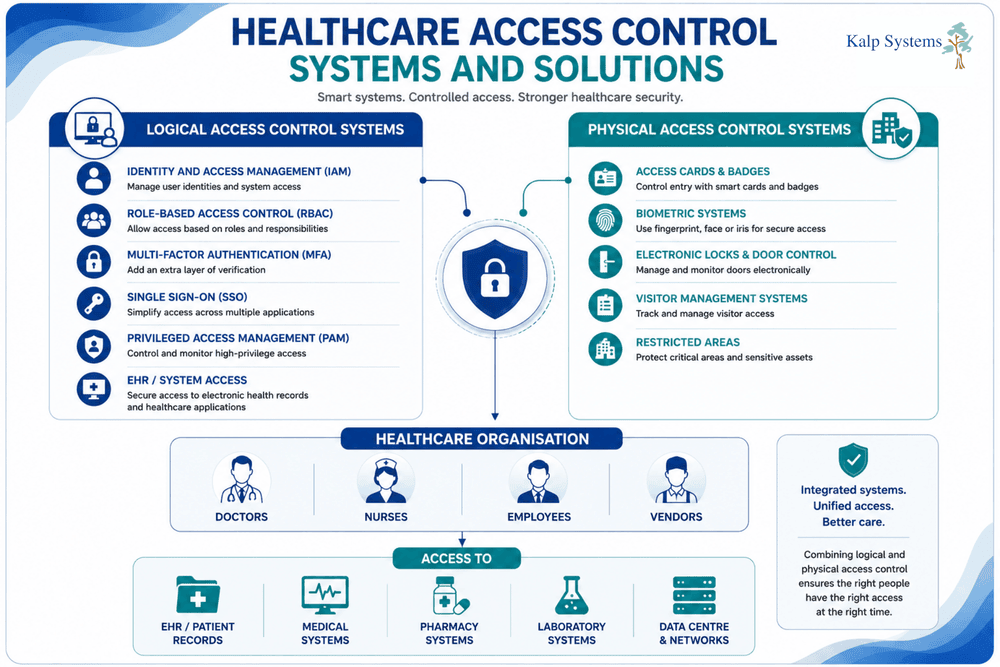
Logical access control systems manage access to digital resources such as electronic health records, applications, networks, databases, and medical systems. Permissions can be assigned according to a person’s role, so users only get access to the systems and information they need for their work.
Common controls include role-based access control, identity and access management, multi-factor authentication, single sign on, and privileged access management. These controls can work together, depending on the systems involved and the level of access required.
The important part is what happens when access needs to change. A user who moves to another department may no longer need the same permissions, while a contractor may only need access for a particular task. The system needs to support those changes rather than leaving old access in place.
Physical Access Control Systems
Physical access control systems manage entry to healthcare facilities and restricted areas within them. Access cards and biometric systems are commonly used to control who can enter staff areas, pharmacies, laboratories, operating rooms, and data centres.
Different areas may require different levels of control. A visitor may only need access to a general area, while an employee or contractor working in a restricted location may need specific permission.
As with logical access, physical permissions need to be kept up to date. An access card that continues working after an employee leaves, or a contractor finishes a job can create a gap that is easy to overlook.
Integrating Physical and Logical Access Control
Managing the two types of access separately can make these gaps harder to spot. An employee’s system account may be disabled when they leave, for example, while their physical access card remains active.
Integration can make these changes easier to manage. It also gives security teams more context when reviewing activities. A system log can show when an account was used, while a physical access record can show whether the person entered the relevant area at the same time.
This becomes particularly useful when investigating unusual activity or reviewing access after a role change. Instead of looking at physical and digital access as two unrelated records, organisations can see how they relate to the same person, event, or period.
HIPAA Access Control Requirements for US Healthcare Organisations
HIPAA is usually where the conversation around healthcare access control starts. The requirements are clear about protecting patient information and controlling who can access it. But having a HIPAA compliant process does not necessarily mean that access is being managed well every day.
HIPAA Technical Safeguards
The technical side is mainly concerned with access to electronic protected health information. Users should have their own identities, access should be controlled, and activity should be recorded.
In practice, this means looking at things such as user identification, access permissions, audit controls, and controls for situations where emergency access is needed.
The difficult part is keeping those controls current. A permission that made sense six months ago may not make sense today if the person’s role has changed.
HIPAA Physical Safeguards
HIPAA also considers the physical side of protecting electronic health information. Healthcare organisations need to think about who can enter areas where sensitive systems, devices, or information are being used or stored.
This is where physical access controls come into the picture. A pharmacy, server room, laboratory, or other restricted area may need tighter controls than a general part of the facility.
Again, the access needs to be reviewed over time. Giving someone an access card is easy. Making sure they still need it later is where the process can fall short.
Access Control and the HIPAA Security Rule
The HIPAA Security Rule sets expectations around protecting electronic protected health information, including controlling access to it.
But the rule itself cannot keep an organisation’s permissions up to date. That still comes down to how the organisation manages its people, systems, and access.
Someone changes departments. A contractor finishes the project. An employee leaves. New systems have been introduced. All of these changes can affect who should have access.
Why HIPAA Compliance Is Only a Baseline
Following HIPAA does not automatically mean that an organisation has closed every access gap.
Audit logs are a good example. They may be in place as required, but that does not mean someone is actively looking at them. The same applies to access reviews. An organisation may have a review process, but if reviews are delayed or rushed, outdated permissions can remain unnoticed.
This is why access control needs to be treated as an ongoing process rather than something that is completed once for compliance.
Healthcare Access Control Best Practices
Healthcare access control can look very different from one organisation to another. A large hospital may have hundreds of systems, restricted areas, staff members, vendors, and connected devices to manage. A smaller healthcare provider may have fewer systems, but the same basic problem remains people should only have the access they need, and that access should change when their role changes.
This is where the day-to-day management of access becomes important. Permissions need to be reviewed, temporary access needs to be removed, and unusual activity needs attention. Physical access also needs to be considered alongside digital access, rather than managed as a completely separate issue.
A few practices can help keep that process under control.
Apply the Principle of Least Privilege
Access should match what someone actually needs to do their job. A doctor may need access to clinical records and applications, for example, while someone working in billing may need access to insurance and payment information instead.
The difficulty comes when those requirements change. Someone moves to another department or takes on a temporary responsibility, and additional permissions are added. The old access is not always removed.
Over time, this can leave users with more access than their current role requires. Applying the principle of least privilege helps keep those permissions closer to what is actually needed.
Use Strong Authentication and Multi Factor Authentication
Strong authentication is an important part of protecting healthcare systems. Users need to prove who they are before they can access sensitive information or applications, and multi factor authentication adds another check beyond the password.
But authentication does not answer every access question. MFA can confirm that the person signing in is authorised to use the account. It does not tell the organisation whether that account still has the right permissions.
That distinction matters in healthcare, where users can have access to several systems, and their responsibilities can change over time.
Review and Remove Access Regularly
Access reviews are one of the simpler controls to overlook. An organisation may have a process in place, but reviews can still be delayed or rushed when there are large numbers of users and systems to check.
The review should look at whether the access still makes sense for the person’s current role. Department changes, promotions, temporary responsibilities, and other changes can all affect what someone needs.
The same applies when someone leaves. Removing their system account is important, but physical access should also be checked. An old access card should not continue working simply because it was missed during the offboarding process.
Monitor Access Activity
It is useful to know who has access, but that does not tell the whole story. Organisations also need to pay attention to how access is being used.
Audit logs can help show when an account was used and what activity took place. This can be particularly useful when something does not fit the user’s normal responsibilities or when an incident needs to be investigated.
Physical access records can provide another part of the picture. If someone accessed a system while also entering a restricted area, looking at both records together may reveal something that would be missed by reviewing either one alone.
Manage Employee and Third-Party Access
Employees are only one part of the access picture. Healthcare organisations also work with vendors, contractors, temporary staff, and other third parties who may need access to systems or restricted areas.
That access should reflect the work they are doing. A vendor repairing equipment may need access to a particular system or room, but there is little reason for that permission to remain after the work is finished.
This is where temporary access can become a problem. It gets added for a legitimate reason, but removing it later is sometimes overlooked. Keeping track of when third party access should end can help prevent those permissions from becoming permanent.
Integrate Physical and Logical Access Controls
Physical and logical access are often managed separately, even though they can affect the same person and the same situation.
An employee leaving the organisation is a simple example. Their system access may be removed quickly, while their physical access card remains active. A contractor may lose access to an application but still be able to enter a restricted area.
Looking at both sides together gives organisations better visibility. It also helps when investigating incidents, because system activity and physical access records can provide context for each other.
The goal is not to make every access system identical. It is to make sure that changes affecting a person’s access are reflected across the areas that a person can reach.
Common Healthcare Access Control Challenges
Healthcare organisations deal with access to changes all the time. Employees move between departments; contractors come and go, new systems are added, and medical devices become part of the environment. Keeping access aligned with all of these changes is not always simple.
The problem is often not the absence of an access control system. It is what happens around it. Old permissions can remain active; different systems may not share information, and access that was meant to be temporary can become difficult to track.
Excessive or Unnecessary Access
Access tends to grow over time. Someone may receive additional permissions because they need them for a particular task, but those permissions may remain after the task is finished.
This can leave users with access to systems, information, or areas that are no longer relevant to their role. Regular access reviews can help identify these permissions before they become a larger problem.
Delayed Access Removal
Removing access can be just as important as granting it. When an employee leaves or changes roles, their permissions need to change with them.
Delays can happen when different teams manage different types of access. An employee’s account may be disabled, for example, while their physical access card remains active.
These small delays can create unnecessary exposure, particularly when the access involves sensitive systems or restricted areas.
Third-Party and Vendor Access
Vendors and contractors often need access to healthcare systems or facilities to carry out specific work. The access itself may be completely legitimate.
The difficulty comes when the work is finished. Temporary access is not always removed immediately, especially when the physical and logical permissions are managed separately.
It is therefore important to know what access a third party has, why they have it, and when that access should end.
Legacy Systems and Connected Medical Devices
Healthcare environments rarely consist only of modern systems. Older applications and legacy equipment may still be part of everyday operations, while connected medical devices continue to add more systems and access points.
These environments can be harder to manage because access controls may not work in the same way across every system. Replacing older technology is not always straightforward either, particularly when it is closely tied to clinical operations.
This makes it important to understand what systems and devices are connected, who can access them, and where older technology may create limitations.
Disconnected Physical and Logical Access Systems
One of the more common problems is keeping physical and logical access completely separate.
An employee can have their system access removed but still have an active access card. The same can happen with contractors who lose access to one system while retaining access to a restricted area.
When the two sides are considered together, these gaps become easier to spot. Physical and logical access records can also provide useful context when an organisation needs to understand what happened during an incident.
Healthcare Access Control Implementation Checklist
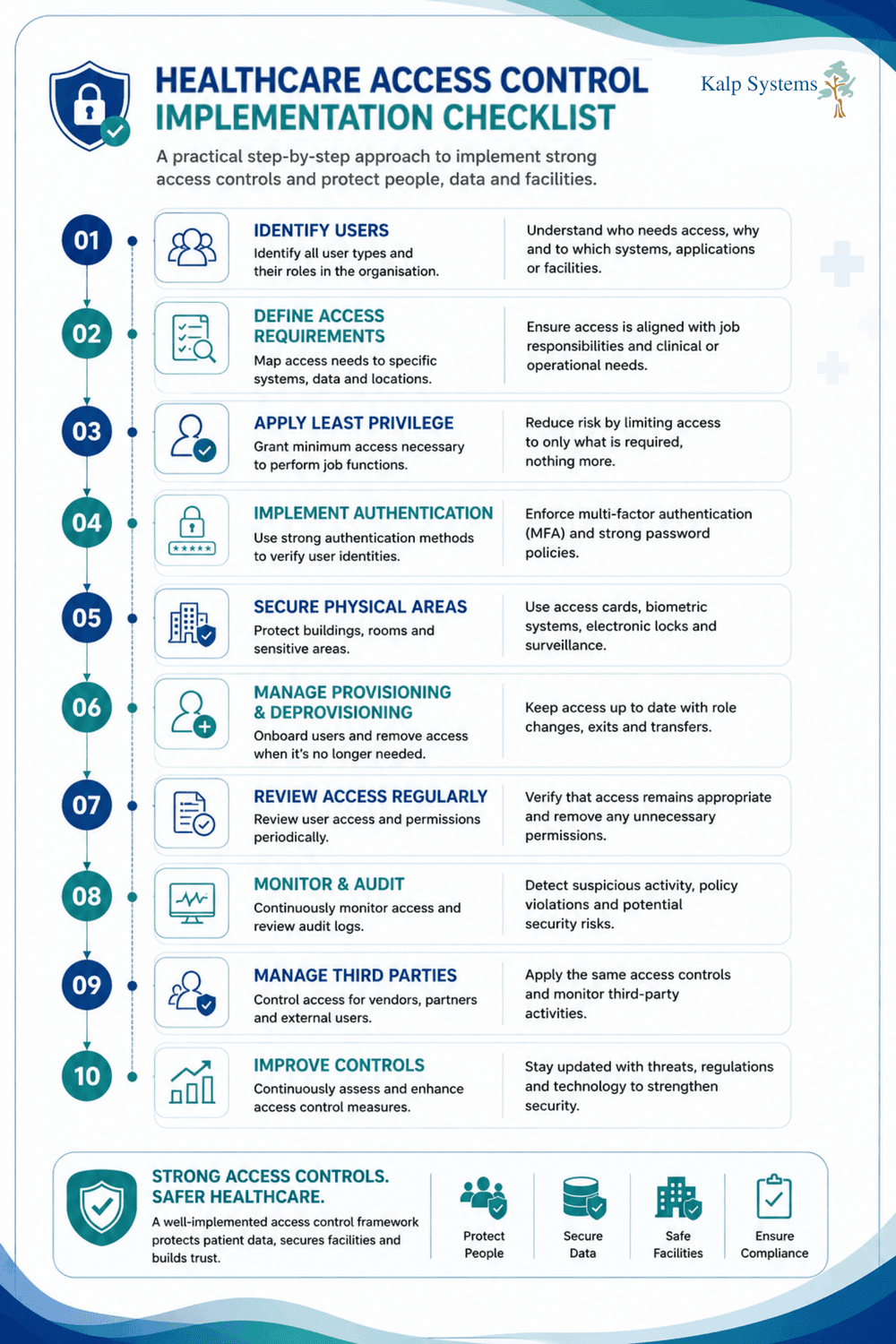
Putting access controls in place is not just about choosing the right technology. Healthcare organisations also need to make sure access is assigned correctly, reviewed when roles change, and removed when it is no longer needed.
The checklist below covers the main areas to review, from user and physical access to third party permissions, access monitoring, connected devices, and HIPAA requirements. It can be used as a practical reference when reviewing an existing healthcare access control setup or planning improvements.
Conclusion
Healthcare access control is not really about choosing between logical and physical controls. Both are needed, and the bigger challenge is making sure they continue to match the way a healthcare organisation actually operates.
Access can change quickly. Employees move between roles; vendors need temporary permissions; new systems are introduced, and connected devices add more points that need to be managed. If physical and logical access are handled separately, it becomes easier for those changes to create gaps.
A stronger approach is to keep access limited to what people need, review it regularly, remove it when it is no longer required, and look at physical and digital activity together where it makes sense.
HIPAA provides an important baseline, but access control should not stop at compliance. The organisations that manage it well are the ones that keep access current and make sure the controls continue to reflect how their people, systems, and facilities actually work.
Frequently Asked Questions
What is healthcare access control?
Healthcare access control is how healthcare organisations decide who can access patient information, systems, devices, and physical areas. It covers both digital access and physical access, so it is not limited to login credentials or passwords.
What is the difference between logical and physical access control?
Logical access control deals with digital systems and information, such as electronic health records, applications, and networks. Physical access control is about entering places such as pharmacies, laboratories, operating rooms, and data centres. In a healthcare environment, both need to be managed because the two can overlap.
What are examples of logical access controls in healthcare?
Examples include user permissions, role-based access control, multi-factor authentication, identity and access management, and audit logs. These controls help determine who can access a healthcare system and what they can do once they are inside.
What access control systems are used in healthcare?
Healthcare organisations use a mix of systems depending on what they need to protect. These can include identity and access management systems, access cards, biometric systems, role-based access controls, and multi-factor authentication. Larger environments may use several of these together.
Does HIPAA require access controls?
Yes. HIPAA includes requirements around controlling access to electronic protected health information. But meeting those requirements is only the starting point. Organisations still need to review access, remove permissions that are no longer needed, and make sure controls are actually being maintained.