HomeBlogCloud SecurityCloud IAM Best Practices for Secure Access Control
Cloud IAM Best Practices for Secure Access Control
What Is Cloud IAM and Why Is It Important?
A cloud account can give someone access to far more than they need for their job. An old employee account might still be active. A service account may have permissions that were added months ago and never reviewed. In a multi-cloud setup, keeping track of all of this gets even harder.
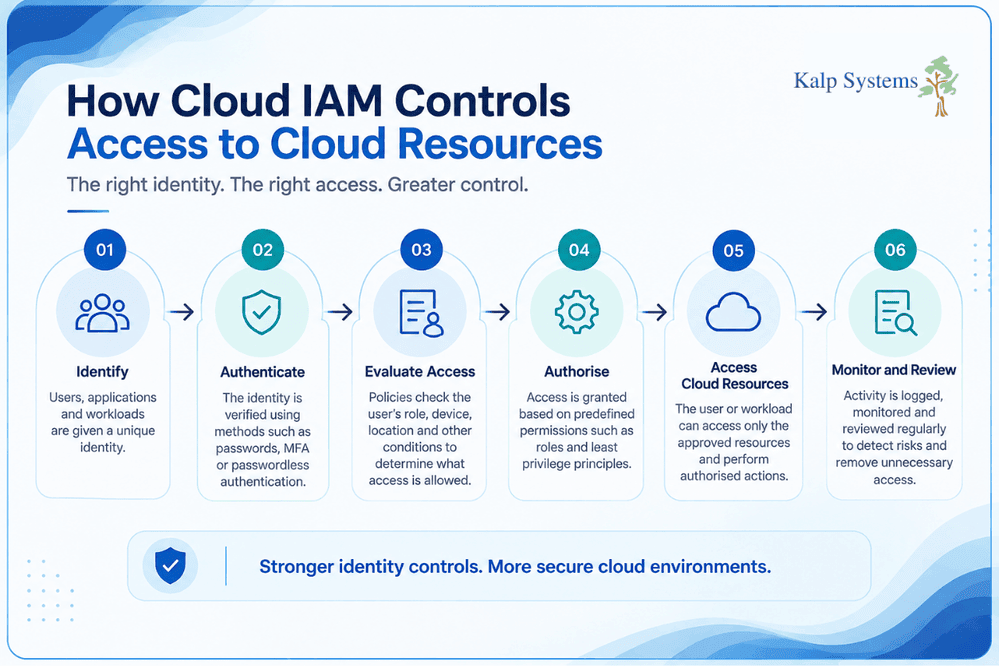
Cloud IAM gives businesses a way to manage those access decisions. It covers the identities using cloud services and the permissions attached to them, from employee accounts and administrators to applications and automated workloads.
Authentication is one part of the process, but it is only the start. The important question comes next: what should this identity be allowed to access? That decision should depend on the person’s role, the resource involved, and the level of access actually required.
For teams managing cloud infrastructure, regular permission checks matter just as much as setting the initial access rules. People change roles, projects end, applications are replaced, and accounts become inactive. IAM needs to keep up with those changes.
Common Cloud IAM Security Risks
Cloud access problems often start with small gaps in day-to-day access management. A permission granted for a temporary task can remain in place. An administrator account may be used for routine work. A former contractor might still have an active login.
These issues can become serious when an attacker gets hold of an account. The level of access already attached to that identity can determine how much damage follows.
Compromised Credentials
Phishing, stolen tokens and malware can give attackers a valid set of credentials. Once they get through authentication, the activity may look like a normal user session, particularly when monitoring is weak.
Excessive Permissions and Privileged Access
Giving users more access than their role requires increases the potential impact of a compromised account. Privileged accounts need even closer attention because they can reach sensitive cloud resources and make significant configuration changes.
Orphaned and Dormant Accounts
Accounts belonging to former employees, contractors or old projects can be overlooked during offboarding. If those accounts remain active, they create another route into the cloud environment.
Third-Party and Non-Human Identity Risks
Vendors, SaaS integrations, service accounts, APIs and automated workloads can all require access to cloud resources. These identities are easy to overlook because they do not behave like regular employees, yet their permissions can still provide access to sensitive systems.
Cloud IAM Best Practices
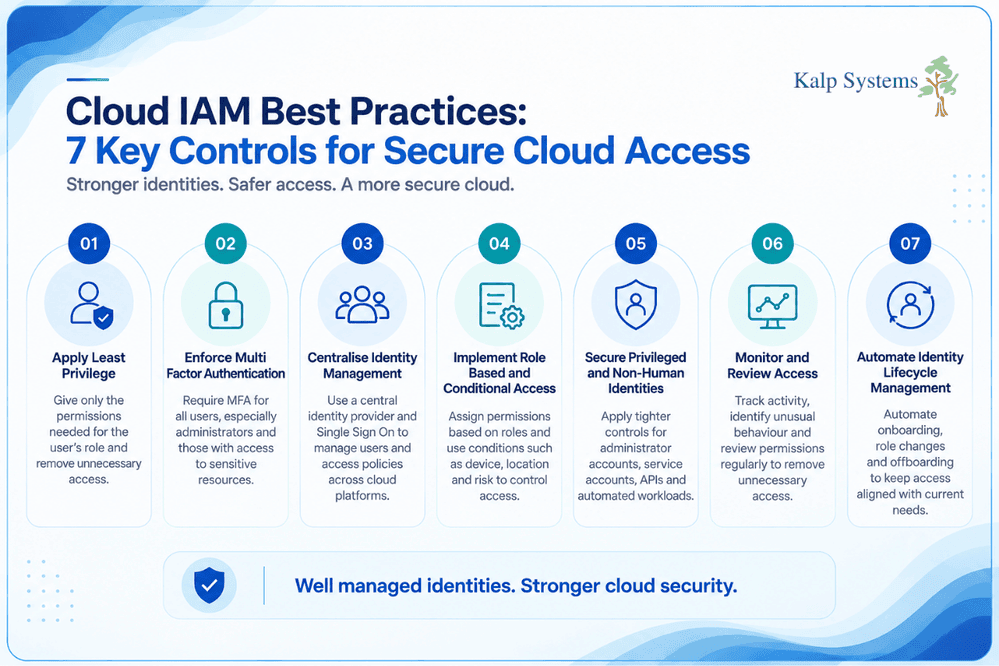
Managing cloud access well comes down to a few practical controls. The aim is to keep permissions tight, make authentication harder to bypass, and keep track of who or what has access as the environment changes.
Apply the Principle of Least Privilege
Give each user or workload only the permissions needed for its job. Someone working with application data, for example, may not need permission to change cloud configurations.
Role-based access can make this easier to manage than assigning permissions individually. Review those roles regularly as responsibilities change and remove access that is no longer required.
Keeping development, testing, and production permissions separate also reduces the chance that an account with limited responsibilities can reach critical resources.
Enforce Multi-Factor Authentication
A password can be stolen. Adding another verification step makes a compromised password much less useful to an attacker.
Require MFA for cloud accounts, particularly for administrators and other users with access to sensitive resources. Where the environment supports it, passwordless methods and hardware security keys can provide stronger protection.
For higher-risk access, authentication can also take account signals such as the device being used, location, or unusual login behaviour.
Centralise Identity Management and Single Sign-On
Managing separate identities across several cloud platforms quickly becomes difficult. A central identity provider gives IT teams one place to manage users and access policies.
Single Sign-On can also reduce the number of passwords employees need to manage while making account provisioning and removal easier to control.
When someone changes roles or leaves the business, their access can be updated or removed centrally rather than relying on teams to remember every cloud service they used.
Implement Role-Based and Conditional Access
Role-based access control assigns permissions according to a person’s responsibilities. It helps avoid creating individual access rules for every user and makes permission reviews easier.
Conditional access adds another layer by considering the circumstances of a request. A login from an unfamiliar device or unusual location, for example, may require additional verification before access is granted.
Secure Privileged and Non-Human Identities
Administrator accounts deserve tighter controls because they can make changes that affect an entire cloud environment. Keep privileged access limited, separate administrative accounts from everyday accounts, and review elevated permissions regularly.
The same attention is needed for service accounts, APIs, containers and automation scripts. Use short-lived credentials where possible, rotate secrets, and avoid storing credentials directly in application code.
Monitor, Audit, and Review Access Regularly
Access controls lose their value when nobody checks what is happening around them. Keep records of authentication, permission changes and privileged activity, then review those records for unusual behaviour.
Regular access reviews are equally important. They can uncover permissions that were appropriate months ago but no longer make sense after a role change, project closure, or change in cloud infrastructure.
Automate Identity Lifecycle Management
Access should change when a person’s circumstances change. New employees need the right permissions; people moving between teams may need some access removed and other access added, and departing users should lose access promptly.
Automating these steps reduces the chance of missed updates and helps keep access consistent across cloud services.
Cloud IAM for Remote and Hybrid Workforces
Remote and hybrid working has changed how employees access business systems. Someone may connect to a cloud application from a home network in the morning and from a different device or location later in the day. Cloud access policies need to account for that change.
This is where identity and access controls become important. Teams can use authentication, device information, and access conditions to decide whether a request should be allowed, rather than relying on the user’s location alone.
Secure Remote Access to Cloud Resources
MFA should be required for cloud accounts, especially where users can reach sensitive resources. Conditional access can add another check when a request comes from an unfamiliar device, location, or other unusual context.
Access should also be reviewed when someone’s role changes. A permission that was useful for one project or responsibility may no longer be needed later.
Protect Cloud and SaaS Application Access
SaaS applications should be included in the same access management process as other cloud resources. Users should receive the permissions required for their role, while unused access should be removed during regular reviews.
Single Sign-On can simplify this process by connecting application access to a central identity system. It also makes it easier to manage access when someone joins the business, changes roles, or leaves.
For businesses using several SaaS platforms, keeping track of application access is important. An account that is forgotten or left active can create another path into the environment if its credentials are compromised.
Cloud IAM, Zero-Trust, and Compliance
Cloud IAM also supports broader security and compliance work. Access decisions should follow the same basic principle across cloud services: verify the identity, give it the access it needs, and keep a record of important activity.
How Cloud IAM Supports Zero-Trust Security
Zero Trust works well with Cloud IAM because both approaches place greater focus on identity and access. A user should not receive broad access simply because they are connected to a company network.
Access can be checked using factors such as identity, device condition, location, and the sensitivity of the resource being requested. Where the risk changes, the access decision can change too.
Least privilege is another important part of this approach. Keeping permissions limited reduces what an account can reach if its credentials are compromised.
Cloud IAM and Compliance Requirements
Access controls also need to support the business’s regulatory and audit requirements. Teams should be able to show who has access to sensitive resources, why that access was granted, and what activity took place.
Regular access reviews, permission records, and authentication logs can help with this process. In India, requirements such as the Digital Personal Data Protection Act, along with ISO 27001 and sector-specific regulations, make controlled access and accountability important considerations.
Cloud IAM can support these requirements by restricting access to sensitive data, maintaining access records, and providing evidence for audits and investigations.
Cloud IAM Trends in 2026
Cloud environments are changing, and identity controls are changing with them. Password-based access is giving way to stronger authentication methods, while security teams are looking for better ways to spot risky behaviour and manage permissions across growing cloud estates.
Passwordless Authentication and Adaptive Access
Passwordless methods such as biometrics and hardware security keys are becoming more practical for cloud access. At the same time, adaptive access can use signals such as device, location, and user behaviour to decide when additional verification is needed.
Identity Threat Detection and Response
IAM activity can provide useful signals when an account starts behaving differently from its usual pattern. Monitoring authentication and access events can help security teams identify suspicious activity and respond before the account is used to reach more resources.
AI-Driven Access Decisions and Identity Governance
AI is increasingly being considered risk-based access decisions, while identity governance is receiving more attention as cloud environments grow. Regular access reviews and better visibility into permissions can help teams keep access aligned with current roles and requirements.
Conclusion
Cloud access changes as quickly as the people, applications, and workloads using it. Permissions that made sense when they were first assigned can become unnecessary later, especially in environments with multiple cloud services and remote users.
That is why Cloud IAM needs regular attention. Keep permissions limited, protect important accounts with stronger authentication, review access as roles change, and keep an eye on service accounts and other non-human identities.
The result is a cloud environment where access is easier to understand and unnecessary exposure is easier to spot.
Frequently Asked Questions
What is Cloud IAM?
It is the access control layer used around cloud resources. It keeps track of identities and their permissions, including employees, administrators, applications, and service accounts.
What are the Best Practices for Cloud IAM?
Keep permissions limited, require strong authentication, review access regularly, and remove accounts that are no longer needed. It is also worth paying attention to service accounts and other workloads, which can easily accumulate permissions over time.
Why is Least Privilege Important in Cloud IAM?
Because an account can be compromised even when the account itself is legitimate. Limiting its permissions gives an attacker fewer places to go and fewer actions they can take.
How does Cloud IAM Support Zero Trust Security?
It gives Zero Trust something practical to work with. Identity, permissions, MFA, device information, and other access conditions can all be considered before a request reaches a cloud resource.
How can Businesses Secure Non-Human Identities in the Cloud?
First, find them. Service accounts, APIs, containers, and automation tools are easy to overlook when access is managed mainly around employees. Once identified, their permissions should be kept narrow and their credentials rotated or replaced with short lived credentials where possible.