HomeBlogCloud SecurityCloud Shared Responsibility Model: What Organisations Need to Know in 2026
Cloud Shared Responsibility Model: What Organisations Need to Know in 2026

Why Cloud Security Needs a Shared Responsibility Approach
Cloud adoption has moved from experimentation to business-critical infrastructure. Businesses now use cloud platforms for core applications, customer platforms, data storage, analytics, and AI workloads. As these environments become more important, the way security responsibilities are assigned matters just as much as the security controls themselves.
A common assumption is that moving workloads to a major cloud provider means the provider handles security for everything in the environment. That is not how cloud security works. The provider protects the underlying infrastructure, while customers still have to secure the applications, data, identities, and settings they control.
This becomes harder to manage when a business uses several cloud providers, SaaS applications, APIs, containers, and automated deployment tools. A security gap can appear when nobody is clear about who owns a particular control.
The shared responsibility model helps clarify that division. It gives security and IT teams a way to understand what the cloud provider manages, what the customer needs to manage, and where both sides have a role.
What is the Cloud Shared Responsibility Model
The cloud shared responsibility model explains how security and compliance responsibilities are divided between the cloud service provider and the customer.
The provider is responsible for securing the cloud infrastructure it operates. This includes areas such as physical data centres, hardware, network infrastructure, and the virtualisation layer. The customer remains responsible for the parts of the environment they configure and use, including data, identities, applications, access controls, and security settings.
The division changes depending on the service being used. An IaaS environment gives the customer more control, which also means more security tasks remain with them. PaaS shifts some of that responsibility to the provider, while SaaS places more of the underlying technology under the provider’s management.
The model can be summarised simply:
- Provider: Secures the underlying cloud infrastructure.
- Customer: Secures what they build, store, configure, and run in the cloud.
- Shared areas: Some controls depend on both the provider’s capabilities and the customer’s configuration and use of those services.
Understanding this distinction helps prevent gaps in protection. A cloud platform can provide strong security controls, but those controls still need to be configured and used correctly by the customer.
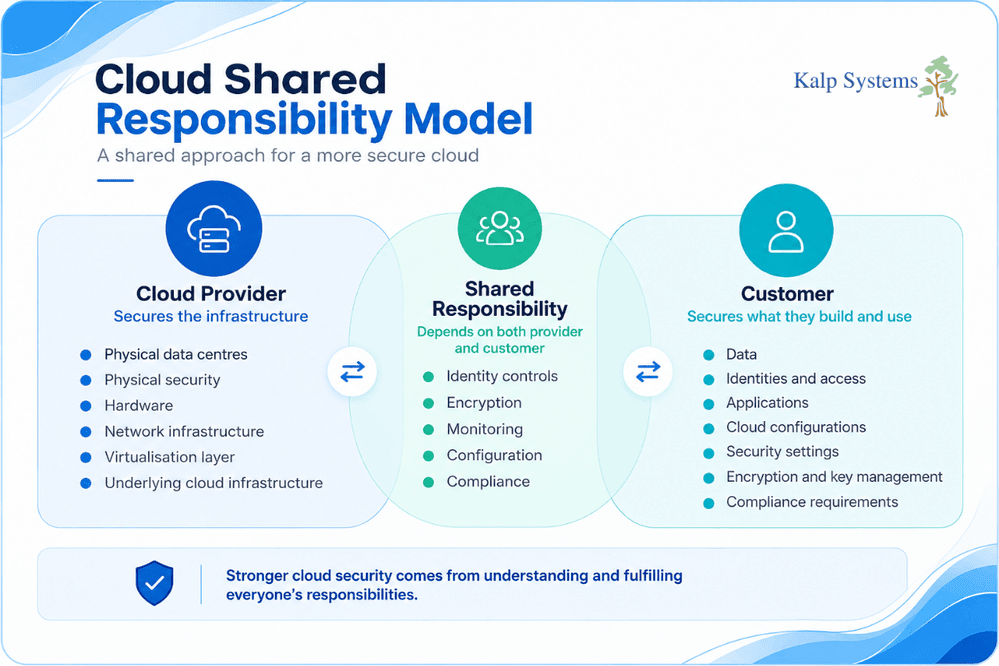
Cloud Provider vs Customer Security Responsibilities
The shared responsibility model becomes easier to understand when the individual security tasks are separated between the cloud provider and the customer. The provider manages the security of the infrastructure that supports the cloud service. The customer is responsible for securing the resources, data, and access they control.
The exact division can vary by cloud service and provider, so these responsibilities should always be checked against the specific platform being used.
Cloud Provider Responsibilities
The cloud provider is responsible for the infrastructure that customers rely on to run their workloads. This includes physical data centre security, hardware, storage systems, network infrastructure, and the virtualisation layer.
The provider also maintains the underlying services that make the cloud platform available and secure. Customers generally do not manage the physical servers or data centre facilities themselves.
These controls form the foundation of the cloud environment, but they do not cover everything a customer deploys within it.
Customer Responsibilities
Customers remain responsible for the security of the resources they create and configure.
Depending on the service, this can include operating system patching, identity and access management, network settings, security groups, firewalls, application security, data protection, encryption, and key management.
Access management deserves particular attention. Giving users or applications more permissions than they need can expose sensitive resources even when the underlying cloud infrastructure is properly secured.
Customers also need to understand their compliance obligations. Using a cloud provider does not remove the need to protect personal or sensitive data and maintain appropriate security controls.
Where Security Responsibilities Overlap
Some areas cannot be assigned entirely to one side. Identity, encryption, monitoring, configuration, and compliance can involve controls provided by the cloud platform as well as decisions made by the customer.
For example, a provider may offer encryption capabilities, but the customer still needs to decide where encryption is required and configure the relevant services correctly. The same principle applies to identity controls. A provider can supply authentication and access management features, while the customer determines who gets access and what permissions they receive.
This is where a clear understanding of the shared responsibility model becomes useful. It helps security teams identify which controls are available, which need to be configured, and who is accountable for maintaining them.
Shared Responsibility across IaaS, PaaS and SaaS
The amount of security a customer needs to manage depends on the cloud service being used. IaaS gives the customer more control over the environment, while PaaS and SaaS leave more of the underlying technology with the provider.
That does not mean the customer’s security role disappears as the service becomes more managed. Data, user access, permissions and configuration still need attention in all three models.
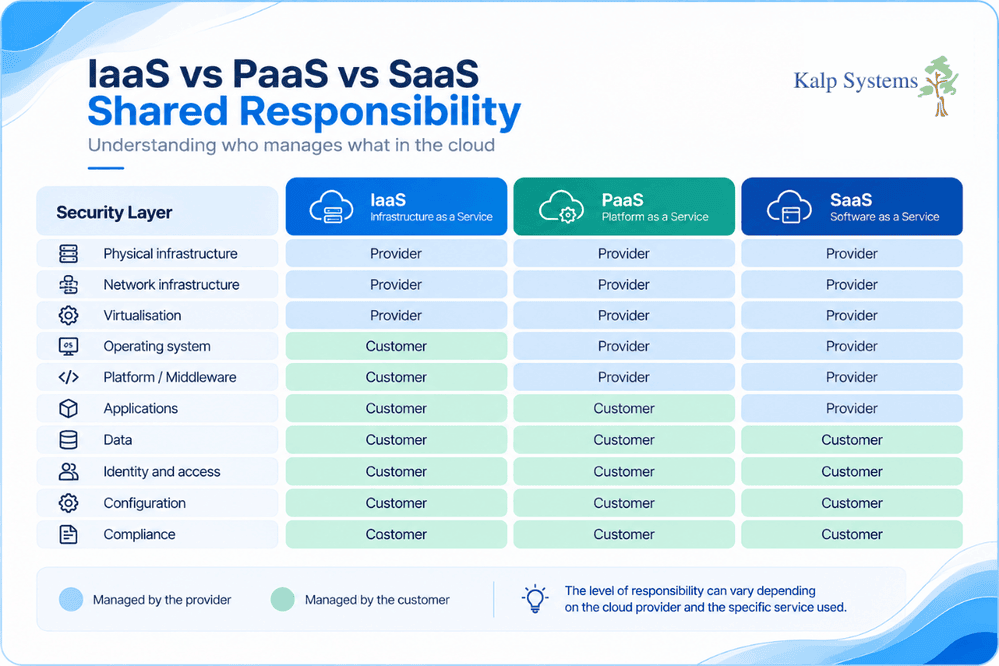
Infrastructure as a Service (IaaS)
IaaS gives customers control over infrastructure such as virtual machines, storage and networks. The cloud provider takes care of the physical data centre, hardware, network infrastructure and virtualisation layer.
The customer manages much more of the environment. This can include operating systems and patching, security groups and firewalls, identity and access management, data encryption, key management and application security.
A simple configuration mistake can expose a workload even when the underlying infrastructure is secure. For example, an overly permissive network rule or an unpatched operating system can leave a system open to attack.
Platform as a Service (PaaS)
With PaaS, the provider manages more of the technology underneath the application. This usually includes the operating system and platform services such as databases and middleware.
The customer still needs to take care of the application, its data and the access given to users and other systems. Secure API usage, authentication, permissions and data protection are also part of the customer’s security work.
PaaS reduces some of the maintenance work, but the security of the application and its configuration still depends on how the service is used.
Software as a Service (SaaS)
SaaS can create the most confusion around security responsibilities because the provider manages most of the application and infrastructure.
The customer still controls who can use the service, what they can access and how the available security settings are configured. Strong authentication, MFA, appropriate permissions and proper data handling are therefore important.
For example, giving too many users access to sensitive information can create a data exposure risk even though the SaaS provider is responsible for securing the platform itself.
Key Cloud Security Risks in 2026
Cloud environments bring together identities, applications, data, APIs and automated processes. Each of these can introduce a security problem when access or configuration is poorly managed.
Some risks are technical, while others come from simple gaps in visibility and ownership.
Identity and Access Risks
User accounts and service identities can become an easy way into cloud resources when they have weak authentication or more access than they need.
Excessive permissions are particularly risky. An account that only needs access to one application should not automatically have access to sensitive storage, databases or other critical resources. Strong authentication, MFA and regular access reviews can help reduce this risk.
Cloud Misconfiguration and Data Exposure
Cloud services provide many configuration options, and a small mistake can have serious consequences. An exposed storage bucket, an open network rule or an incorrectly configured access policy can make sensitive resources accessible to people who should not have them.
Configuration reviews should therefore be part of routine cloud security work. Teams need to know what resources exist, who can access them and whether those settings still match business requirements.
API, Automation and SaaS Risks
APIs and automated deployment tools are now common parts of cloud environments. They also introduce additional points that need protection. Exposed credentials, poorly protected secrets or excessive permissions in CI/CD pipelines can give attackers access to cloud resources.
SaaS creates another area to watch. Unapproved applications and poorly managed permissions can leave sensitive information outside the security team’s normal visibility. Reviewing SaaS access and removing unnecessary permissions can help reduce these gaps.
Cloud Shared Responsibility Best Practices
A clear division of security responsibilities makes it easier to manage cloud risks. Teams should know which controls they own, how those controls are configured, and who is responsible for reviewing them.
Define Security Ownership Clearly
Document who is responsible for important security controls. This should cover cloud infrastructure, identities, applications, data, configurations and compliance requirements.
Clear ownership also makes it easier to respond when a problem is found. There is less chance of a security issue being missed because each team assumes someone else is handling it.
Strengthen Identity and Access Controls
Review user and application permissions regularly and remove access that is no longer required. Use MFA for important accounts and apply least privileges wherever possible.
Service accounts and other machine identities also need attention. They should have only the permissions required for their tasks, with credentials and secrets protected properly.
Secure Cloud Configurations
Cloud resources should be checked regularly for settings that could expose systems or data. Security groups, storage permissions, access policies and other controls can change as workloads develop.
Automated configuration checks can help identify risky settings sooner, while regular reviews help confirm that controls still match the way cloud services are being used.
Protect Data and Encryption
Sensitive data should be identified and protected according to its level of risk. Encryption can help protect data both when it is stored and when it is being transmitted.
Encryption keys also need proper management. Access to keys should be restricted and monitored so that a compromised account cannot easily gain control of protected data.
Monitor Cloud Environments Continuously
Security teams need visibility into activity across cloud resources, accounts and applications. Logs and alerts can help identify unusual access, configuration changes and other suspicious activity.
Regular monitoring also gives teams a better view of whether the controls covered by the shared responsibility model are actually being maintained.
Cloud Security and Compliance Responsibilities
Cloud security in India is closely connected with compliance. Moving data or applications to a cloud platform does not remove the customer’s responsibility to meet the requirements that apply to its business.
For Indian businesses, this can include requirements under the Digital Personal Data Protection Act, along with ISO 27001:2022 and sector-specific requirements such as those relevant to BFSI and healthcare.
The cloud provider may offer security features, logging, encryption and other controls that support compliance. The customer still needs to configure and use those controls correctly and make sure its own processes meet the relevant requirements.
This is particularly important when personal or sensitive data is stored in cloud services. Teams should know where the data is held, who can access it, how it is protected and what happens if a security incident occurs.
Compliance responsibilities therefore need to be considered when defining the shared responsibility model. They should form part of cloud governance from the beginning rather than being checked only when an audit is approaching.
How Kalp Systems Supports Cloud Security
Kalp Systems helps businesses in Ahmedabad secure and manage cloud environments by assessing, securing, and optimising access, configuration, and compliance.
Its cloud security services include:
- Cloud security architecture and assessments
- Identity and access management strategy
- Cloud compliance readiness for DPDP and ISO 27001
- Secure cloud migration and configuration reviews
- Continuous cloud risk monitoring and improvement
These services can help businesses understand their cloud security responsibilities and address gaps across the areas they manage.
Conclusion
Cloud security in 2026 is defined by shared responsibility, not shared assumptions. Cloud providers secure the infrastructure they provide, while businesses remain responsible for protecting their data, identities, applications, and cloud configurations.
The responsibility is different across IaaS, PaaS, and SaaS. Businesses need to understand what their cloud provider manages and what remains in their hands. This is especially important for access controls, configurations, data protection, and compliance.
Understanding the shared responsibility model is a practical starting point for managing cloud security. It helps businesses see where security gaps can occur and where additional controls may be needed as their cloud environment grows and changes.
Frequently Asked Questions
What is the Shared Responsibility Model in Cloud Security?
The shared responsibility model sets out which security tasks belong to the cloud provider and which ones the customer needs to handle. The provider takes care of the underlying cloud infrastructure. The customer looks after the data, applications, identities, and settings within its cloud environment.
The split depends on the service being used, so the responsibilities are different for IaaS, PaaS, and SaaS.
Who is Responsible for Security in the Cloud?
Both sides have a role. The cloud provider protects the infrastructure and services it operates. The customer has to secure the resources it uses, including user access, data, applications, and cloud configurations.
The important point is to know where the provider’s responsibility ends and where the customers begins.
What is the Customer Responsible for Cloud Security?
The customer is responsible for the parts of the cloud environment it controls. This can include identity and access management, application security, data protection, encryption, security configurations, and compliance requirements.
With IaaS, the customer also has more infrastructure related tasks, such as operating system security, patching, network configurations, and firewalls.
What is the Cloud Provider Responsible For?
The provider secures the infrastructure that supports its cloud services. This includes physical data centres, hardware, network infrastructure, and the virtualisation layer.
The provider’s responsibilities depend on the service being delivered, so customers should check the specific responsibility model for the cloud platform they use.
How does Shared Responsibility Differ between IaaS, PaaS and SaaS?
IaaS leaves more security work with the customer because the customer manages more of the environment. In PaaS, the provider takes care of additional platform components, while the customer still manages its applications, data, and access.
SaaS places most of the underlying technology with the provider. The customer still has to manage users, permissions, data, authentication, and service settings.